STELLARIS
An Interstellar Strategy and AI Simulation Game Based on Raspberry Pi
A Project By Qingyin Zhong and Zhe Tong
Introduction
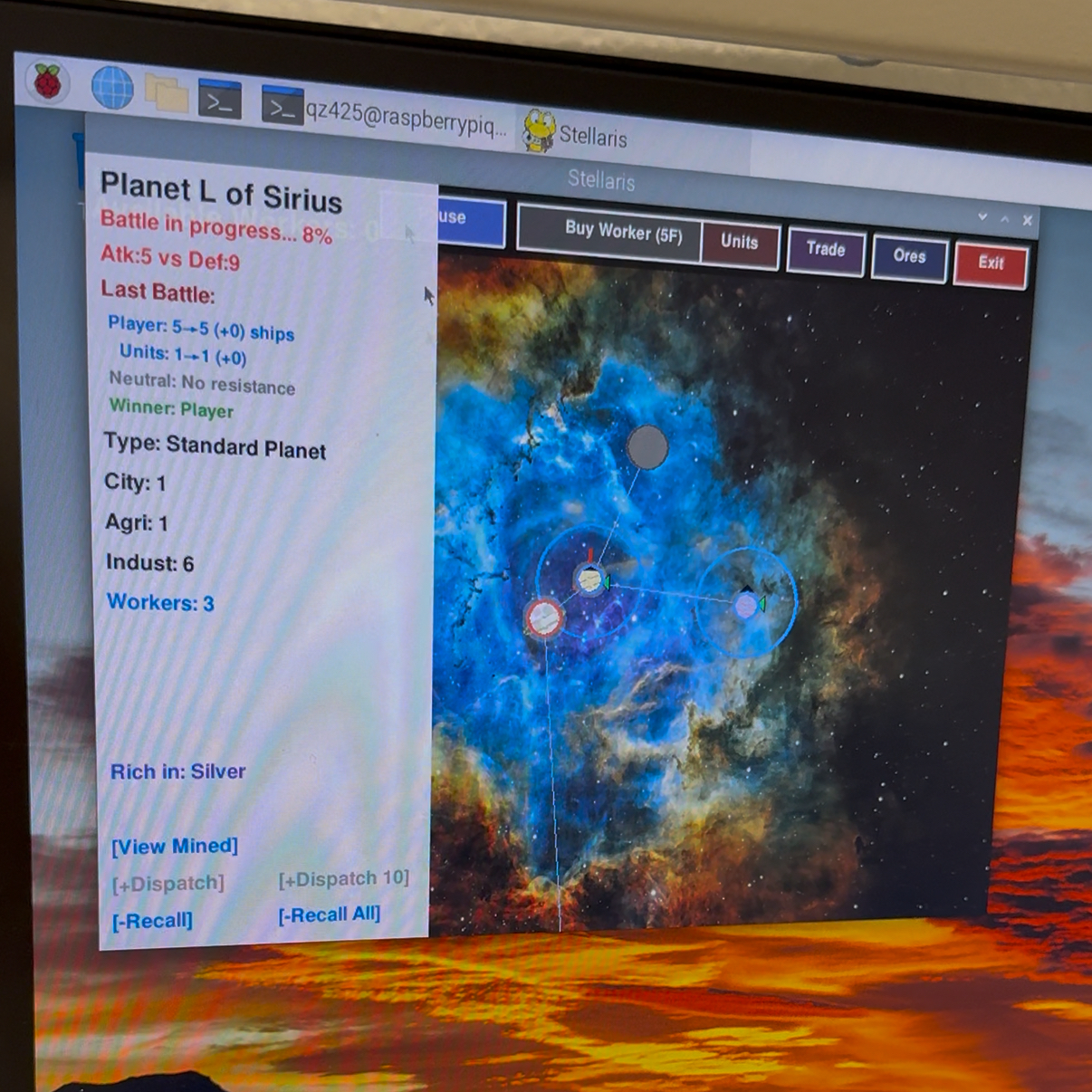
This project implements a fully playable 2D interstellar real-time strategy (RTS) game on a Raspberry Pi 4, built with Python/Pygame and integrated with embedded peripherals. Players can pan and zoom across star systems, buy food, hire workers, mine minerals, colonize planets, manage resources, and battle an AI opponent. The win condition is to be the first to capture the opponent's homeworld. To highlight the embedded aspect, we bind the game state to a physical NeoPixel LED strip, providing low cost, high salience feedback. Additionally, the PiTFT's 4 hardware buttons are mapped to frequently-used in-game actions (pause, buy worker, trade, exit), enabling quick access without touchscreen interaction.
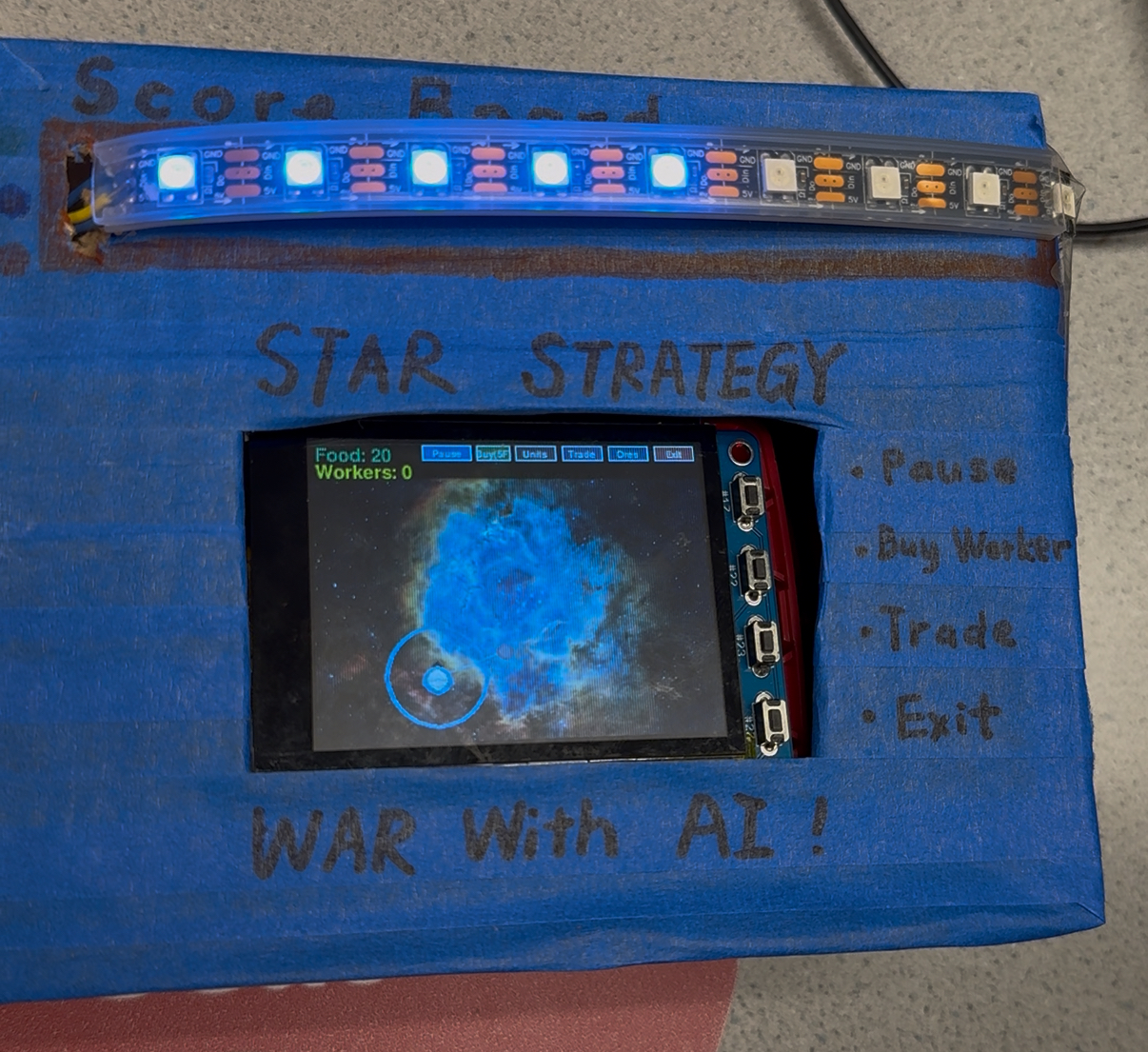
Project Objective:
- Be able to run the essential core logic—buy workers, assign them to mine, sell minerals to gain wealth, purchase different unit types, transport units by starship to begin colonization and combat, and achieve victory—so that a complete game can be played smoothly from start to finish.
- Integrate a NeoPixel (9 LED) progress bar linked to game state (all on = win, all off = loss. orange/blue/green for disadvantage/even/advantage).
- Implement PiTFT hardware button controls (GPIO 17, 22, 23, 27) for quick access to common game actions (pause, buy worker, trade, exit) with proper debouncing.
- Add an AI opponent (we choose to use API instead of an if statement opponent) and ensure that AI versus player matches are challenging.
- Stability: continuous play whole game without crash.
- Enrich the variety of minerals, unit types, and planet types, and introduce subtle counter relationships among units to enhance gameplay depth and fun.
Design
Software Design
The game consists of 4,346 lines of code organized into 8 layered classes:
- Hardware Layer (Line 1-200): NeoPixel LED control system using 9 LEDs to display real-time game status (blue=even, green=advantage, orange=disadvantage) via GPIO 12. GPIO button initialization for 4 PiTFT hardware buttons (GPIO 17, 22, 23, 27) with pull-up resistor configuration and debounce handling.
- Display Layer (Line 201-340): Display device detection and configuration, supporting both PiTFT touchscreen (320x240) and external monitor (800x600) modes with automatic environment detection and SDL parameter configuration.
- Audio Layer (Line 341-410): Audio system initialization, loading 5 game sound effects (clicks, alerts, etc.) and background music, supporting multi-channel simultaneous playback.
- UI Resource Layer (Line 411-575): UI resource configuration including resolution adaptation, Chinese font loading, background image/starfield generation, color definitions, and game constants (planet names, mineral colors, etc.).
- Game Data Layer (Line 576-902): Game base data definitions including game state enums (menu/difficulty selection/in-game), planet type enums, and 5 combat unit data catalogs (health/attack/price/special abilities).
- Game Object Layer (Line 591-1082): Core game object classes:
- CelestialBody: Celestial objects (stars/planets), handling resource generation, ownership, and rendering
- MovingFleet: Mobile fleets, managing unit transportation
- StarSystem: Star system objects, containing 1 star + 2-4 planets
- Game World Layer (Line 1083-3927): Core layer (66.6% of codebase) - GameWorld class managing the entire game world:
- Star system generation and layout
- Resource management system (5 mineral types + USD)
- Unit recruitment and movement
- Combat system (including special unit abilities)
- Worker construction system
- AI decision system (rule-based AI + LLM AI)
- Camera system (drag/zoom)
- Complete UI rendering (resource panel, planet info, build panel, minimap, etc.)
- Victory/defeat determination
- UI Interaction Layer (Line 3928-4346): Main loop and event handling:
- Menu drawing functions
- Button definitions (difficulty/scale selection)
- main() main loop: 60FPS event processing, state updates, rendering
- Mouse/touch event response
- GPIO hardware button polling with falling edge detection and 200ms debounce (pause, buy worker, trade, exit)
- Keyboard shortcuts
- Resource cleanup (LED/NeoPixel/GPIO/Pygame)
Hardware Design
System Overview
- Main controller: Raspberry Pi 4
- Display: HDMI for the final demo; PiTFT 480×320 compatibility code retained (PiTFT uses GPIO18 for backlight)
- Peripherals: NeoPixel (WS2812B) 9-LED strip, data pin on GPIO12 (BCM12, physical Pin 32); PiTFT 4 physical buttons (GPIO 17, 22, 23, 27)
- Input: Mouse / touch (when using PiTFT) / PiTFT hardware buttons
- Audio: pygame.mixer
Key Wiring
| Signal/Power | Raspberry Pi Pin | Connect To | Notes |
|---|---|---|---|
| Data | GPIO12 / BCM12 / Pin 32 | LED strip DIN | Series 500 Ω |
| GND | Any GND (e.g., Pin 6) | LED strip GND and 5 V PSU GND | All three must share a common ground |
| +5 V | External 5 V supply (+) | LED strip +5 V | — |
| Electrolytic capacitor | — | Across strip input +5 V ↔ GND | 100 µF |
Signal Integrity & Protection
- Series resistor (500 Ω): damps ringing/overshoot and protects the first LED's data input.
- Capacitor (100 µF): mitigates inrush current and voltage dips during sudden load changes.
- Common ground: the Pi GND, LED strip GND, and 5 V supply GND must be connected together.
- Power-up sequence: connect GND → +5 V → start program output; reverse the order when powering down.
PiTFT Hardware Buttons
The PiTFT screen includes 4 physical buttons that provide quick access to common game functions without requiring touchscreen interaction. All buttons use internal pull-up resistors and are triggered on falling edge with 200ms debounce time.
| GPIO Pin | Button Function | Description |
|---|---|---|
| GPIO 17 | Pause/Resume | Toggle game pause state during gameplay |
| GPIO 22 | Buy Worker | Purchase a worker for 5 food (if sufficient resources available) |
| GPIO 23 | Trade | Toggle trade panel display for buying/selling minerals |
| GPIO 27 | Exit | Exit the game and clean up resources (works in any game state) |
Implementation Details:
- Pull-up configuration: All buttons configured with internal pull-up resistors (GPIO.PUD_UP)
- Debounce: 200ms debounce time to prevent multiple triggers from mechanical bounce
- Edge detection: Falling edge detection (button state changes from HIGH to LOW when pressed)
- Audio feedback: Click sound effects play when buttons are pressed (when available)
Drawings
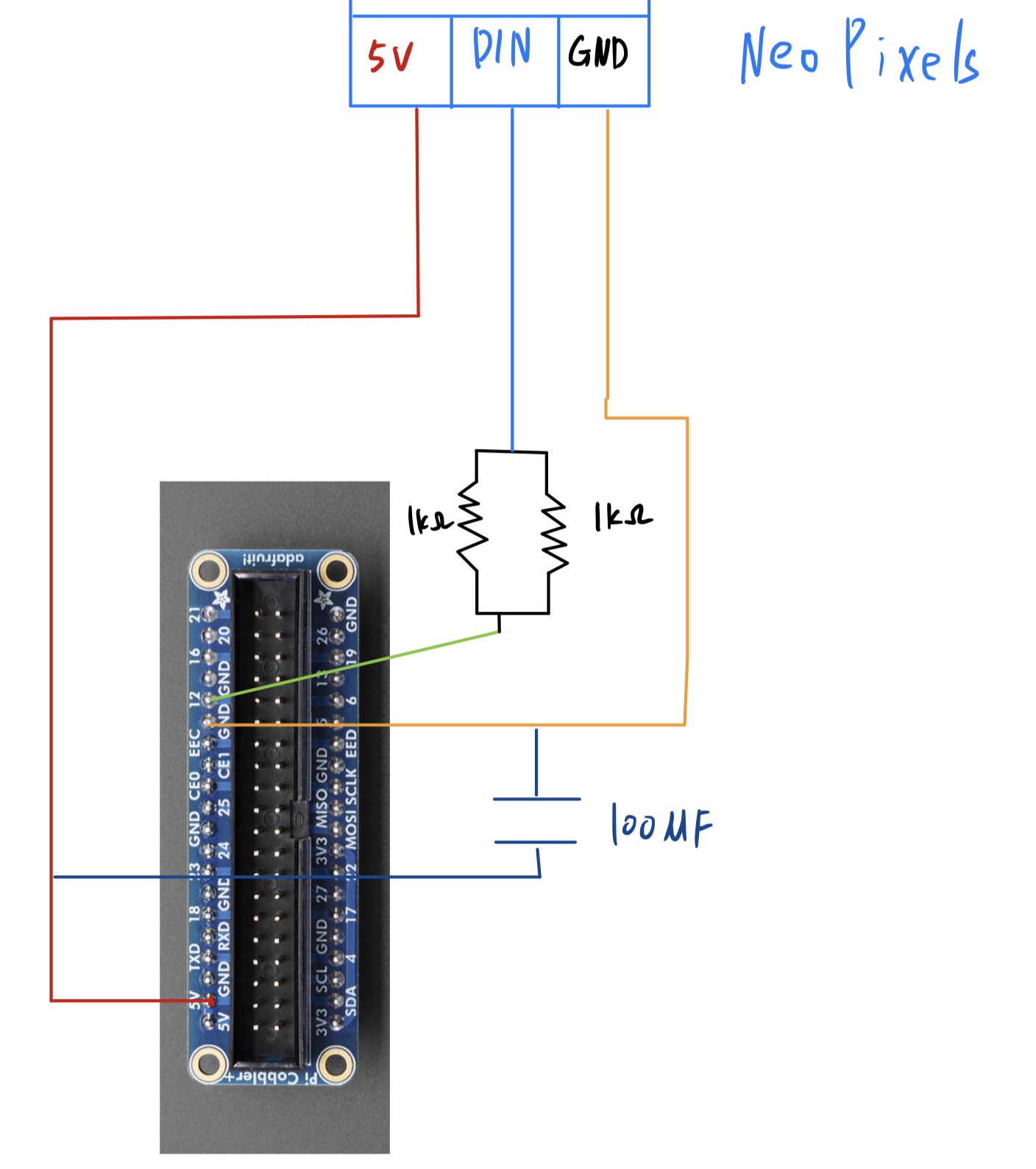
Wiring Overview
The system integrates a Raspberry Pi 4 with a NeoPixel LED strip and PiTFT buttons:
- NeoPixel Strip (9 LEDs): Connected to GPIO12 (Pin 32) for data. Powered by an external 5V supply with a common ground to the Pi. Includes a 500Ω series resistor for data protection and a 100µF capacitor for power stability.
- PiTFT Buttons: Four tactile buttons wired to GPIO 17, 22, 23, and 27. These use internal pull-up resistors and trigger game actions (Pause, Buy Worker, Trade, Exit) on falling edges.
Testing
1. Objectives & Acceptance Criteria
- Playability: Complete a full game loop (buy workers → mining → trading → recruit units → transport → colonize/combat → capture opponent's homeworld).
- Stability: Continuous gameplay ≥30 min without crashes or resource leaks.
- LED Mapping: 9 LEDs with correct logic (initial 5 lit; 1–3 orange; 4–7 blue; 7–9 green; all on = victory, all off = defeat), refresh rate ≥10 Hz.
- PiTFT: 480×320 display with no overlapping elements, clickable buttons, average ≥25 FPS.
- Hardware Buttons: All 4 PiTFT buttons (GPIO 17, 22, 23, 27) respond correctly with proper debouncing, no false triggers.
2. Testing Environment
- Hardware: Raspberry Pi 4 (HDMI for main demo; PiTFT compatible), NeoPixel 9 LEDs (GPIO12), PiTFT hardware buttons (GPIO 17, 22, 23, 27).
- Power: Official Pi 5V/3A; (if separate 5V for LED strip, share common ground with Pi).
- Software: Python 3.11, Pygame, rpi_ws281x, RPi.GPIO, AI via API.
3. Functional Test Cases
| Stage | Purpose | Steps | Expected Result |
|---|---|---|---|
| F-01 | Economic cycle | Buy workers → assign to mine → sell minerals | Assets calculated correctly with price fluctuations (±50%) |
| F-02 | Unit recruitment & transport | Buy multiple unit types → form fleet → move across star systems | Path connected, movement by edge weight, engage/colonize upon arrival |
| F-03 | Counter relationships & combat | Trigger combat with unit counters | Damage & conversions follow design, generate combat summary |
| F-04 | Victory determination | Capture enemy homeworld | Victory popup, all LEDs lit |
| F-05 | Defeat determination | Own homeworld captured | Defeat popup, all LEDs off |
| F-06 | Save/Exit | Normal exit | Resources released (LED strip off, audio stopped), no residual processes |
4. AI Testing (API Mode)
| ID | Purpose | Steps | Expected Result |
|---|---|---|---|
| A-01 | Connectivity | Disconnect/reconnect network | Offline triggers local if-statement logic; reconnection resumes API |
| A-02 | Decision quality | Multiple matches | Shows expansion & attack rhythm, not random wandering |
| A-03 | Decision latency | Sample continuously for 5 min | p95 ≤4 s, timeout doesn't block rendering |
5. LED (NeoPixel) Test Cases (GPIO12)
| ID | Purpose | Steps | Expected Result |
|---|---|---|---|
| L-01 | Initial state | Enter game | 5 LEDs lit (neutral) |
| L-02 | Advantage growth | Continuously capture planets | LED count increases monotonically; 7–9 LEDs are green |
| L-03 | Disadvantage decline | Enemy captures planets | LED count decreases monotonically; 1–3 LEDs are orange |
| L-04 | Even state | Both sides contending | 4–7 LEDs are blue |
| L-05 | Victory/defeat mapping | Win/lose determination | Victory: all lit; Defeat: all off; refresh ≥10 Hz |
6. PiTFT Display/Touch & Hardware Buttons
| ID | Purpose | Steps | Expected Result |
|---|---|---|---|
| T-01 | Font & layout | Run at 480×320 | Text doesn't overlap, buttons not obscured |
| T-02 | Touch accuracy | Continuously click common buttons | Low mis-tap rate, consecutive triggers possible |
| T-03 | Performance | Continuous operation for 1 min | Average ≥25 FPS |
| B-01 | Button GPIO 17 (Pause) | Press during gameplay | Game pauses/resumes correctly, no double-trigger |
| B-02 | Button GPIO 22 (Buy Worker) | Press with sufficient food | Worker purchased, resources deducted, audio feedback plays |
| B-03 | Button GPIO 23 (Trade) | Press to toggle trade panel | Trade panel appears/disappears correctly |
| B-04 | Button GPIO 27 (Exit) | Press to exit game | Clean exit with resource cleanup (LEDs off, no residual processes) |
| B-05 | Button debouncing | Rapid press any button | 200ms debounce prevents multiple triggers, no false positives |
7. Performance & Stability
- FPS: Record 60s average ≥30 (HDMI).
- Input latency: Key press → screen update median ≤50 ms.
- Resources: Monitor memory/CPU; memory increase <10% over 30 min gameplay.
- Stress test: Simultaneous combat + unit recruitment + trading for 1 min, no freeze/frame drop/crash.
8. Acceptance Checklist
- Complete game playthrough smooth, no crashes
- HDMI average FPS ≥30; input latency median ≤50 ms
- AI decision p95 ≤4 s
- LED color & on/off logic correct, refresh ≥10 Hz
- All 4 PiTFT hardware buttons functioning correctly with proper debouncing
- Exit releases LED strip/audio/GPIO resources
- README, run scripts, and results website complete
Result
In the end, we successfully completed the game and realized almost all of our initial ideas, solving countless issues along the way. At first, we tried to download the AI model onto the PiTFT so we could use AI battles without connecting to a phone hotspot, but we found the AI's memory footprint was too large and the local AI wasn't strong enough to feel challenging. We therefore switched to using an API for the AI, but then ran into an interesting problem: whenever the AI was "thinking," the whole game would stutter. We discovered this was because the AI and the game were running in the same thread, causing blocking; separating them into different threads resolved the issue. We faced many such problems, and ultimately worked through them all.
The only regret is that, because PiTFT touch is not precise enough, we ended up playing the game over HDMI. This doesn't match our original plan to make the PiTFT into a small handheld with on-screen controls. Our UI has many small buttons, which leads to frequent mis-taps on the PiTFT and significantly hurts the gameplay experience.
Work Distribution
Game Development
- Main game logic: Work together (see details below)
- AI logic: Mainly Qingyin Zhong
- Game menu interface: Mainly Qingyin Zhong
- Planet and star generation, linking, and path logic: Mainly Qingyin Zhong
- Trading and economic cycle logic: Mainly Zhe Tong
- Mining logic: Mainly Zhe Tong
- Starship logic: Mainly Qingyin Zhong
- Unit types and worker logic: Mainly Zhe Tong
- Victory/defeat determination: Work together
- Fog of war: Work together
- Other details (background BGM, images, etc.): Mainly Qingyin Zhong
Hardware & Testing
- LED integration and logic: Mainly Zhe Tong
- Game testing: Work together
- Debug and bug fixes: Work together
- Game optimization: Work together
- PiTFT display optimization: Work together

Qingyin Zhong
qz425@cornell.edu
AI implementation, Game menu interface, planet/star generation and linking, starship logic, sound effect implementation

Zhe Tong
zt286@cornell.edu
Trading and economic systems, mining logic, unit types, LED hardware integration and logic, button hardware integration and logic
Parts List
- Raspberry Pi - Provided in lab
- PiTFT - - Provided in lab
- NeoPixel Ring - Provided in lab
Total: $0 ^_^
References
NeoPixels with MakeCode - AdafruitPygame GitHub Repository
ECE 5725 Course Materials - Cornell Canvas
Code Appendix
📥 Download Complete Source Code (touch_democurrently.py)
Below are key code snippets demonstrating the hardware integration:
GPIO Button Initialization & Event Handling
# GPIO button configuration with pull-up resistors
import RPi.GPIO as GPIO

GPIO.setmode(GPIO.BCM)
GPIO.setwarnings(False)

# PiTFT button pins
BUTTON_17 = 17  # Pause
BUTTON_22 = 22  # Buy Worker
BUTTON_23 = 23  # Trade
BUTTON_27 = 27  # Exit

# Configure with pull-up resistors
for pin in [BUTTON_17, BUTTON_22, BUTTON_23, BUTTON_27]:
    GPIO.setup(pin, GPIO.IN, pull_up_down=GPIO.PUD_UP)

# Debounce state tracking
button_last_state = {17: True, 22: True, 23: True, 27: True}
button_last_time = {17: 0, 22: 0, 23: 0, 27: 0}
DEBOUNCE_TIME = 0.2  # 200ms

# Button polling in main loop (falling edge detection)
current_time = time.time()
button_state = GPIO.input(BUTTON_17)
if button_state == False and button_last_state[17] == True:
    if current_time - button_last_time[17] > DEBOUNCE_TIME:
        game_world.paused = not game_world.paused
        button_last_time[17] = current_time
button_last_state[17] = button_state
NeoPixel LED Game Status Update
# NeoPixel initialization
import board
import neopixel

NEOPIXEL_PIN = board.D12  # GPIO 12
NUM_PIXELS = 9
pixels = neopixel.NeoPixel(NEOPIXEL_PIN, NUM_PIXELS,
                          brightness=0.44, auto_write=False)

# Game status LED update function
def update_game_status_leds(player_planet_count, ai_planet_count):
    # Calculate LED count based on relative planet ownership
    player_delta = player_planet_count - led_game_state['last_player_count']
    ai_delta = ai_planet_count - led_game_state['last_ai_count']

    # Adjust LED count
    if player_delta > 0 or ai_delta < 0:
        led_game_state['current_leds'] = min(9, led_game_state['current_leds'] + 1)
    elif player_delta < 0 or ai_delta > 0:
        led_game_state['current_leds'] = max(0, led_game_state['current_leds'] - 1)

    # Set LED colors based on advantage level
    for i in range(NUM_PIXELS):
        if i < led_game_state['current_leds']:
            if led_game_state['current_leds'] <= 3:
                pixels[i] = (113, 35, 0)   # Orange (disadvantage)
            elif led_game_state['current_leds'] <= 6:
                pixels[i] = (0, 22, 113)   # Blue (even)
            else:
                pixels[i] = (0, 113, 0)    # Green (advantage)
        else:
            pixels[i] = (0, 0, 0)  # Off
    pixels.show()
AI Decision System (Threading)
# Threaded AI to prevent game blocking
import threading

def ai_think_thread(game_world):
    """AI decision making in separate thread"""
    try:
        # Get game state for AI
        state_description = game_world.get_ai_state_description()

        # Call LLM API for decision
        response = requests.post(AI_API_URL,
                                json={"prompt": state_description},
                                timeout=4)

        # Parse and execute AI action
        action = parse_ai_response(response.json())
        game_world.execute_ai_action(action)
    except Exception as e:
        # Fallback to rule-based AI
        game_world.rule_based_ai_turn()

# Start AI thread (non-blocking)
if game_world.ai_turn:
    ai_thread = threading.Thread(target=ai_think_thread, args=(game_world,))
    ai_thread.daemon = True
    ai_thread.start()